You bought a professional theme for your company website, installed a translation plugin, and expected the Arabic version to look as good as the English one. Then you opened the site and found text still in English, menus on the wrong side, flipped icons and an Arabic font that does not match the design. This is the most common problem I see on Gulf business websites.
This article is part of the Arabic Localization & RTL section. It explains why translation plugins alone are not enough, and what layers proper theme localization actually involves.
In short: translation plugins only translate the text they can reach. Layout direction, text hardcoded in theme files, fonts and icons need direct technical work.
Translation vs localization
Translation swaps words: "Read More" becomes its Arabic equivalent. Localization makes the whole theme behave as if it was designed for Arabic from the start: direction, spacing, fonts, numbers, even which way the "next" arrow points. Customers never notice good localization, but they notice its absence immediately.
Why translation plugins are not enough
1. Text hardcoded in the theme: many themes write some text directly into template files without making it translatable, so no plugin can reach it.
2. The layout does not mirror: translation plugins do not change your stylesheets, so if the theme lacks full RTL support, elements stay in their English positions.
3. Bundled plugins: forms, sliders and WooCommerce messages each have their own text and styling that need separate handling.
4. Machine translation: some plugins translate automatically, producing odd phrases on buttons and headings that undermine customer trust.
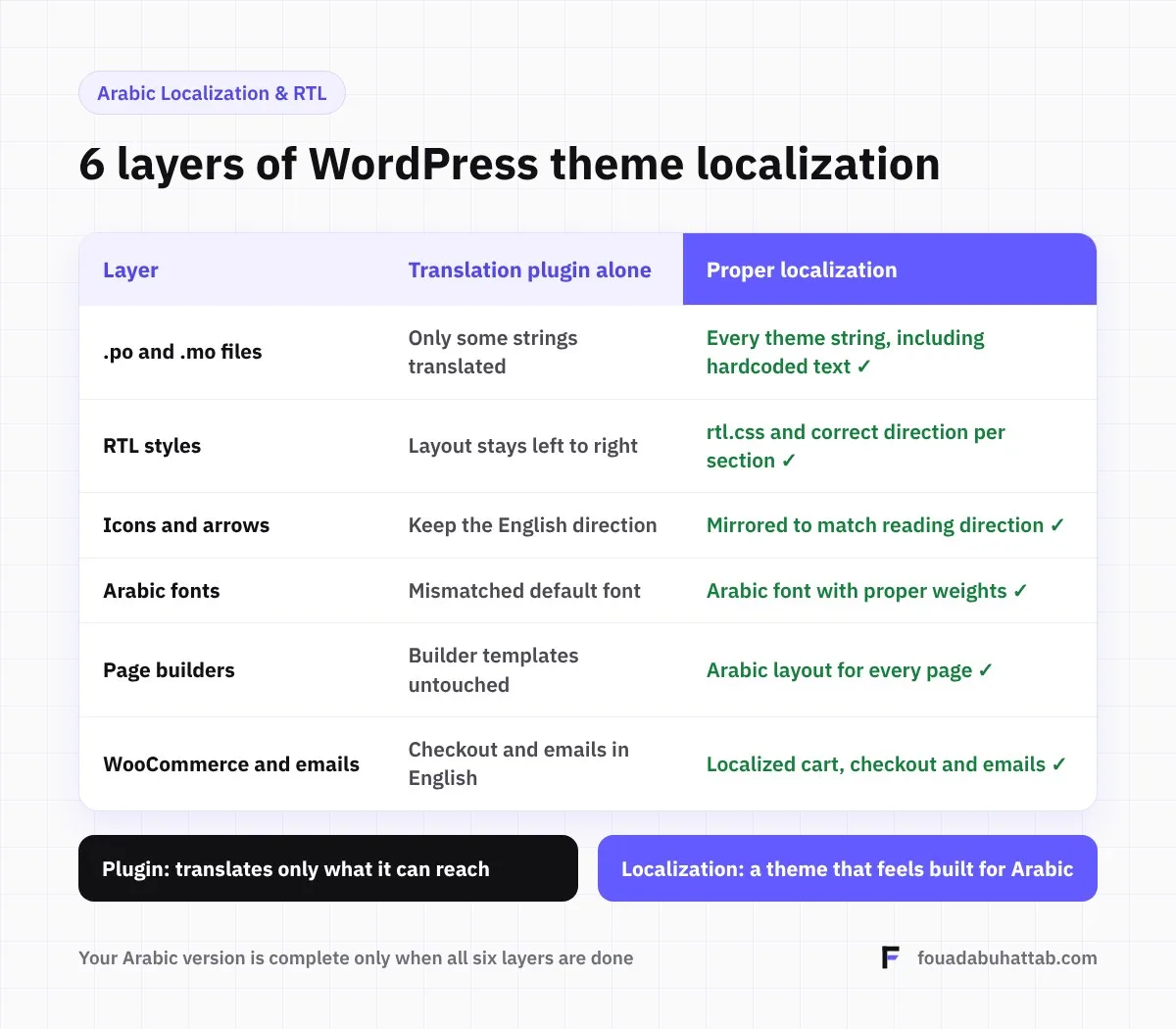
The layers of proper theme localization
1. Translation files (.po and .mo)
Theme strings are translated through dedicated language files using a tool like Loco Translate, and text that is not translation-ready is fixed in a child theme so it is not lost with the first update.
2. RTL styles
Styles are adjusted so spacing, alignment and element positions mirror correctly. The best approach uses CSS logical properties (such as margin-inline-start) that adapt to direction automatically instead of maintaining two versions.
3. Icons and arrows
Directional arrows flip, while logos and icons such as a clock or a play button do not. Mixing the two up is one of the most common mistakes.
4. Arabic fonts
Choose an Arabic font that matches the personality of the English one, and adjust its size and line height, since the same size usually looks smaller in Arabic.
5. Page builders
If the site is built with Elementor or a similar builder, spacing and alignment set manually on each element need review in the Arabic version, because the builder does not always mirror them automatically.
6. WooCommerce and emails
Cart and checkout pages, order emails, invoices and currency formatting. These are the most important steps in a purchase, and any English text there can cost you the order.
Have a theme that needs professional localization? Send me the theme name or your site link, and I will identify which layers need work before we start. Request theme localization
How to choose a theme that is easy to localize
Before buying, make sure the theme page explicitly mentions RTL support and that it is translation ready, look for an Arabic demo if one exists, and read reviews from Arabic-speaking users. This early choice saves most of the localization cost later.
Localization and bilingual websites
Theme localization is the foundation, but a bilingual site also needs a language management plugin such as Polylang or WPML, and separate SEO for each language. I covered this in why your business needs an Arabic RTL website.
Frequently asked questions
Can I localize the theme myself?
Translating simple strings is possible with a tool like Loco Translate. RTL styles and hardcoded text, however, need experience with the theme and CSS, or they may break with the first update.
Will localization be lost when the theme updates?
Yes, if it was done inside the original theme files. That is why proper localization is done in a child theme with separate translation files that survive updates.
How long does theme localization take?
It depends on the size of the theme and how well it already supports Arabic. A theme with good RTL support takes far less time than one never designed for Arabic.
Make your Arabic version as good as your English one
Explore my Arabic localization and RTL service, or get in touch and I will review your theme before any commitment.